Buy a PLN Token with a Foreign Card: No Indonesian Bank Account Needed
Living in Bali or travelling in Indonesia with only a foreign Visa or Mastercard? Buy PLN electricity tokens online without an Indonesian bank account, e-wallet or phone number.
Why your foreign card gets rejected everywhere else
If you live in Indonesia without local banking, you have probably already hit this wall. Your meter starts beeping, you open Tokopedia or your bank app, and your Visa is declined. Nothing is wrong with your card.
Most Indonesian apps route card payments through domestic payment gateways that only accept cards issued by Indonesian banks. GoPay, DANA, OVO and ShopeePay have the same restriction on topping up a balance. The official PLN Mobile app does list credit cards, but foreign cards usually fail at the 3-D Secure step, and you only find out after entering the card details.
That leaves most foreigners doing one of three things: asking a landlord to buy tokens and settling up later, walking to an Alfamart with cash, or routing money through Wise into a local e-wallet first. All of them work. All of them take longer than buying the token directly.
What you actually need
One thing: the meter number. It is the 11 or 12 digit number printed on a sticker on your electricity meter, labelled No. Meter. It is not the ID Pelanggan (IDPEL) from a bill or the PLN app, which is a different number.
You do not need:
- An Indonesian bank account
- An Indonesian e-wallet (no GoPay, DANA, OVO or ShopeePay)
- An Indonesian phone number
- A KITAS, KTP or any Indonesian ID
A prepaid PLN meter is not linked to any phone number in Indonesia. The meter number alone determines where the electricity goes, which is why we do not ask for anything else.
How to buy one
- Open the PLN token page and enter the meter number from your meter.
- Pick an amount. Denominations run from Rp 20.000 up to Rp 1.000.000. The price in euros, including everything, is shown before you pay. There is nothing added at the end.
- Enter and confirm your email. This is where the token is sent, so use one you can open on your phone. We send a 6-digit code to confirm it, which protects your token from ending up in a mistyped inbox.
- Pay with your card. Visa and Mastercard are both accepted, as are Apple Pay and Google Pay. Your bank may ask you to confirm in its app; that is normal 3-D Secure.
- Read the 20-digit token from the confirmation. It appears on screen and arrives by email, usually within 1 minute.
Which cards and wallets work
Cards issued outside Indonesia are the normal case here, not the exception. Working today:
- Visa: credit and debit, issued anywhere
- Mastercard: credit and debit, issued anywhere
- Apple Pay: on iPhone, using whatever card is in your Wallet
- Google Pay: same, on Android
- iDEAL: only useful if you hold a Dutch bank account
Apple Pay and Google Pay tend to be the smoothest option abroad, because your bank has already authenticated you on the device and is less likely to interrupt with an extra check.
How this compares with the alternatives
Being straight about it: buying through an Indonesian e-wallet is cheaper than buying here. If you have a local account, use it.
You are paying a small premium for a card checkout that works without local banking. Whether that is worth it depends on your situation:
- Wise into GoPay or DANA: cheapest of the workarounds, but you need an Indonesian phone number to register the e-wallet, and the first setup takes a while. Sensible if you live here long term.
- PLN Mobile with a foreign card: no fee if it goes through, but foreign cards usually fail at 3-D Secure and you only find out after entering the card details. Worth a try when you have time to spare, not when the meter is already beeping.
- Alfamart or Indomaret: completely reliable, and a good backup. It does require leaving the house, and at 2am with a beeping meter that matters.
- This site: works from anywhere with any card, no local setup at all. You pay a margin for that.
Finding your meter number
The number is on the meter itself, usually on a white or yellow sticker on the front, printed under or beside a barcode. It is 11 or 12 digits with no letters.
If the sticker is unreadable, most prepaid meters will display it: press 75 (Itron meters) or 804 (most other brands) then the accept key (usually green, sometimes marked Enter or #). Older tokens on a previous receipt also carry the number.
Check it carefully before paying. A token is issued against the exact meter number given, and once issued it cannot be moved to a different meter.
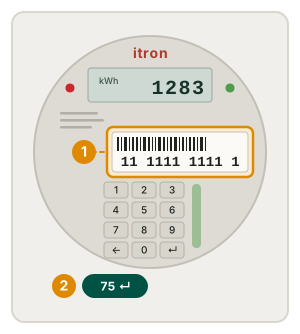
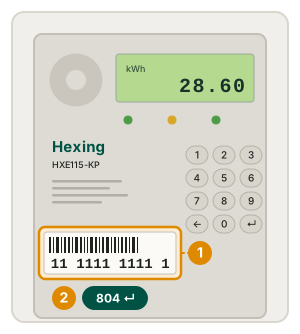
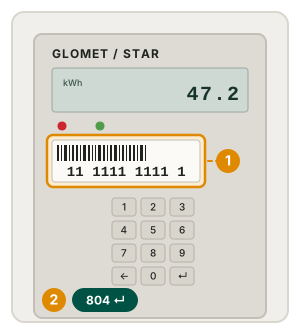
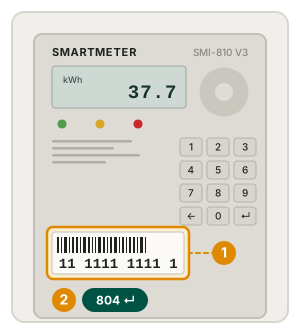
The ring marks where the number is printed on each model, and the green chip is the code that makes that meter display it.
No keypad on your meter at all? Then it is a postpaid meter, billed monthly, and it cannot accept a token. You do not need to buy one.
Entering the token into your meter
- Type the 20 digits on the meter keypad. No spaces or dashes.
- Press the accept key (green on most models, or Enter).
- The display shows BENAR or ACCEPT, and the kWh balance goes up.
If it shows SALAH or REJECT, retype it: a mis-keyed digit is by far the most common cause. A token only fails permanently if it was bought for a different meter, or has already been used.
To silence a low-balance alarm before you have a token, most Hexing and Itron meters accept 45630 followed by the accept key.